
Keep your crew scheduled.
Know where the hours go.
ForeSite Manager brings employee scheduling, time tracking and cost codes together for construction teams. Plan work by jobsite and review the time your crew records.
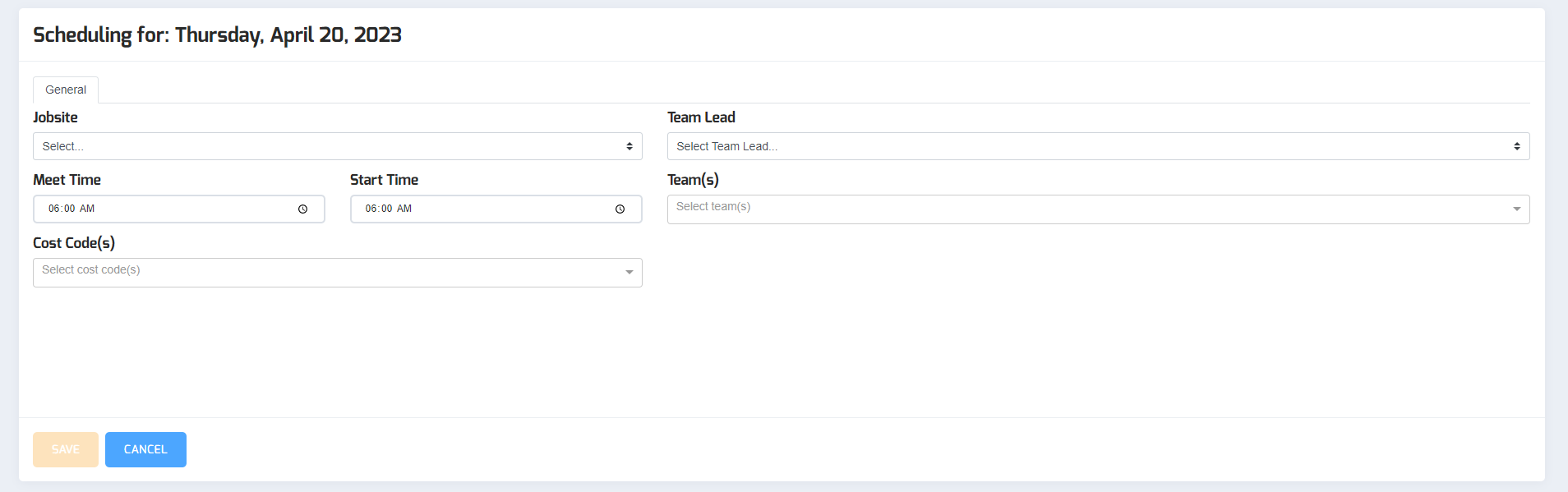
The tools behind a better-organized workday
Give the field and the office a shared way to manage the schedule and recorded time.
Employee scheduling
Assign employees to jobsites, set meet and start times, and see who is still available. Publish schedules when your plans are ready.
Time tracking
Keep employee clock-in and clock-out records together. Team leads can record time for scheduled crew members who do not use a smartphone.
Cost codes
Allocate recorded time to work categories so you can review where labor hours go. Use those records to understand jobsite activity.
From the schedule to the time record
- Set up your crew and jobsitesAdd the people and locations you need to schedule.
- Build and share the scheduleChoose a jobsite, assign your crew and publish the schedule.
- Record and review the workTrack employee time and review hours by jobsite and cost code.
Built from a contractor’s working day
ForeSite Manager began with a problem Jason Evans knew firsthand: too much time spent planning crews on an office whiteboard. He set out to build a scheduling tool he could use away from the office.
That construction background still shapes the product. The focus is practical: organizing people and jobsites, recording time and helping small construction businesses manage daily work.
Based in Marquette, Michigan, ForeSite Manager serves construction teams across the United States.
Monthly pricing by crew size
Choose the employee range that fits your company. Have questions about the right plan? Send us your crew size below.
1–10 employees
$50 / month
11–40 employees
$80 / month
41–100 employees
$110 / month
101+ employees
$150 / month
All prices shown are monthly. Contact us to discuss getting started.
Before you get started
Does every employee need a smartphone?
No. Team leads can record time for employees assigned to their schedules. We can help you work out which setup fits your crew.
What do I need to set up a schedule?
Start with your employees and jobsites. Then choose the jobsite, meet and start times, and the people assigned to the work.
Where can I find instructions for the application?
Our Support library covers setup, jobsites, employees, schedules, time tracking and reports.
How do I choose a plan?
Use the employee ranges in the pricing section. If you are unsure which plan fits, include your employee count in the inquiry form below.
Let’s talk about your crew
Tell us how many employees you schedule and what you would like help managing. We’ll use your message to discuss ForeSite Manager and the next steps for your company.
Already using the application? Visit Support for step-by-step instructions.
You can also email info@foresitemanager.com.